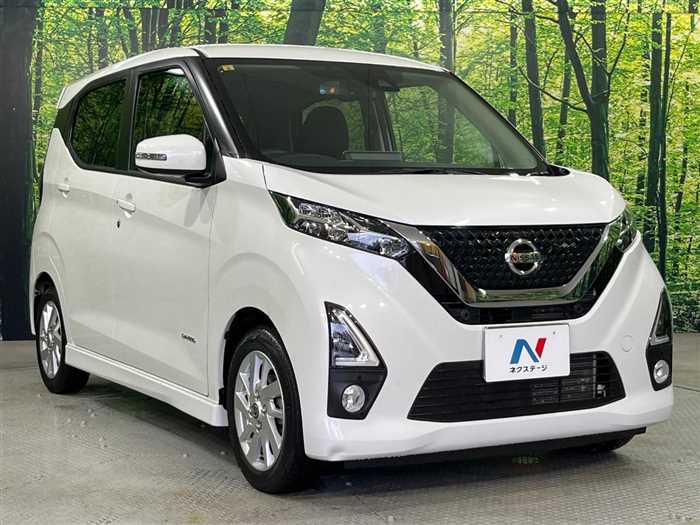
When considering a used car, understanding its mileage history and service records is crucial for ensuring a reliable purchase. The 2020 NISSAN DAYZ is a popular choice for drivers looking for a compact and efficient vehicle. In this guide, we’ll walk you through the steps to check the mileage history and service records of this model.
Why Checking Mileage History and Service Records Is Important
Checking the mileage and service records is essential for several reasons:
Verification of Ownership: Ensures the car has not been stolen or has outstanding loans.
Mileage Red Flags: High mileage can indicate heavy usage, while inconsistencies can suggest tampering.
Maintenance Awareness: Regular service records provide insights into the vehicle’s condition and potential future repairs.
Steps to Check the Mileage History of a 2020 NISSAN Dayz
1. Gather Necessary Information
Before you begin, make sure you have the following details handy:
VIN (Vehicle Identification Number): This 17-character code uniquely identifies the vehicle.
License Plate Number: This will help in locating records associated with the car.
2. Use Online Vehicle History Services
There are several online services that provide vehicle histories based on the VIN. These services may charge a fee but can offer comprehensive reports. Popular options include:
Carfax
AutoCheck
VINCheckPro
Manage to their websites and input the required information. You will receive a report detailing the vehicle’s mileage, accident history, and more.
3. Contact Local Dealerships
Nissan dealerships can provide service records for vehicles they’ve serviced. You can contact them directly with the VIN and ask for any available service history. This usually includes maintenance performed, parts replaced, and any recalls that have been executed.
4. Check with Previous Owners
If possible, reach out to the seller or previous owner. They can provide firsthand insights into the vehicle’s history, repairs, and any issues they faced. This transparency can greatly influence your purchasing decision.
5. Look into Government Databases
In some countries, government databases track vehicle registrations. You may be able to check if there have been any recalls or significant incidents reported on the vehicle. This can provide additional information regarding the car’s past.
Steps to Check Service Records of a 2020 Nissan Dayz
1. Use the Nissan Owner’s Portal
Nissan provides an online platform where owners can find service records. Create an account, if you don’t have one, and enter the VIN. The portal links to the service history performed at authorized dealerships.
2. Service History Reports
In addition to online databases, many service centers keep records of the work they have performed on vehicles. Asking if any local mechanics or service chains have worked on the car can yield valuable service history.
3. Check Warranty Information
If the vehicle is still under warranty, obtaining service records can be easier since most dealerships keep meticulous records on file. This will also help in understanding what repairs or maintenance are still covered.
Final thoughts
Checking the mileage history and service records of a 2020 Nissan Dayz is a straightforward process when you know the right steps to follow. By gathering necessary details, utilizing online resources, and communicating with dealerships or previous owners, you can form a comprehensive picture of the vehicle’s condition. Doing due diligence can lead to a more informed and satisfactory purchase decision. Take your time and ensure the vehicle meets your standards before making any commitments.
FAQs
1. How can I find the VIN of a Nissan Dayz?
The VIN is usually located on the driver’s side dashboard, near the windshield. It can also be found on the driver’s side door jamb or in the vehicle’s documents.
2. Is it safe to buy a used Nissan Dayz without checking its history?
While it is possible to buy a used car without checking its history, doing so increases the risk of purchasing a vehicle with underlying issues. It is always recommended to check the history for peace of mind.
3. Can I check service records if I buy from a private seller?
Yes, you can request service records from the seller. If they don’t have them, you can check with Nissan dealerships where the vehicle might have been serviced.
4. Are there free options for checking vehicle history?
Some services offer limited free checks, but for a comprehensive report, including detailed mileage and accident history, paid services like Carfax or AutoCheck are recommended.
5. What should I do if the mileage seems too low?
If you suspect that the mileage is inaccurate or has been tampered with, investigate further by checking service records and asking for documentation of the vehicle’s history.
Maintaining your vehicle is essential for ensuring its longevity, efficiency, and overall performance. One of the most integral aspects of vehicle maintenance is the oil change. It may seem like...
The NISSAN DAYZ is a compact, efficient kei car that has garnered significant popularity in Japan. Known for its compact size, efficiency, and practicality, the Dayz has become a staple...
In the fast-paced tech world, applications face the challenge of not only meeting user expectations but also providing each user with a seamless experience. To ensure your application stands out,...
As an experienced car inspector in Uganda, I’ve had the opportunity to evaluate a diverse range of vehicles and understand the unique demands of our driving environment. The Nissan Dayz...
Family owned dealership of new and pre-owned vehicles with several locations across the Uganda. Lowest prices and the best customer service guaranteed.
You're almost there, select at least one more to compare!
We use cookies to ensure that we give you the best experience on our website. If you continue to use this site we will assume that you are happy with it.
You can revoke your consent any time using the Revoke consent button.